HTB CDSA - How to Pass (2026)
Context
I’ve seen a lot of people review this exam, however I’ve seen a lot of them come from an experienced red team background. I wanted to provide my take as someone newer to the career with a blue team focused background. 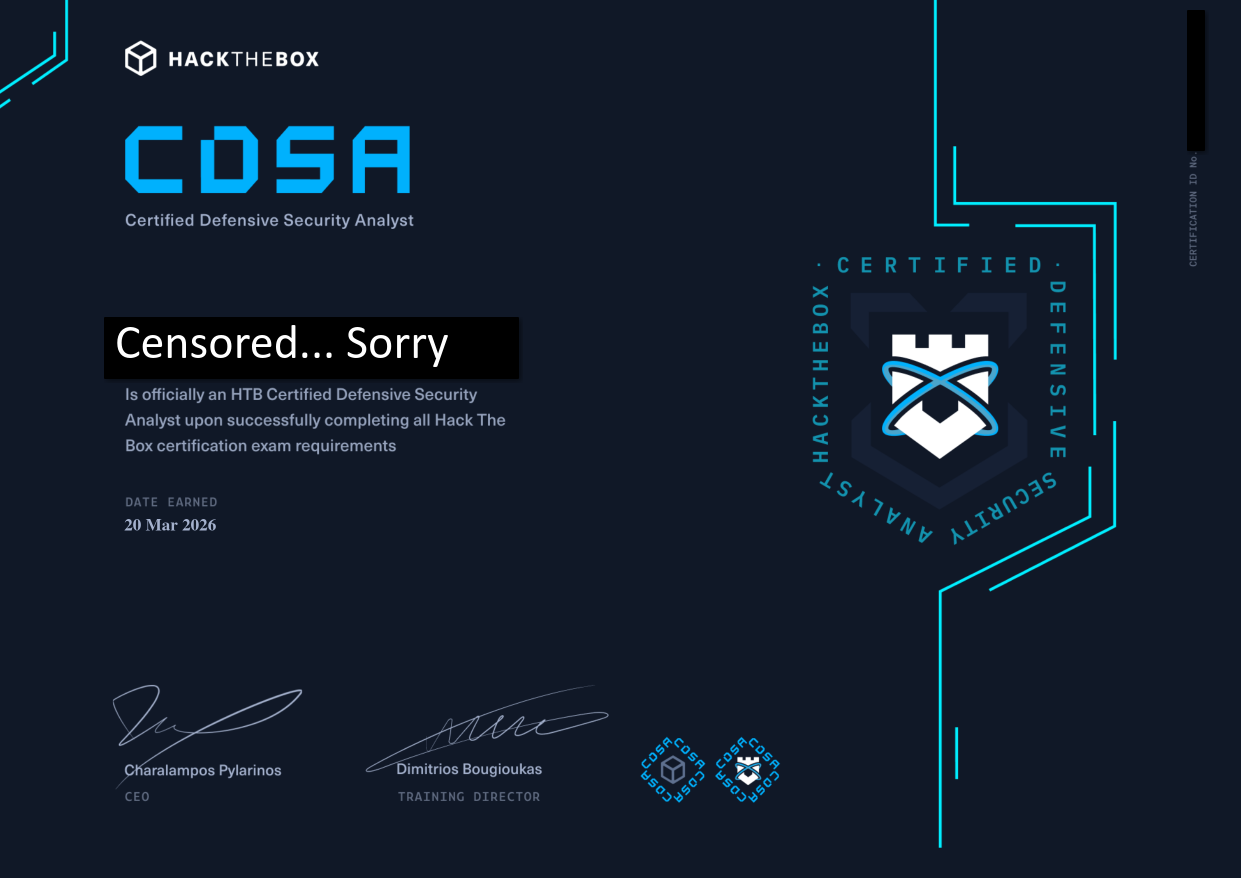
What is This Exam?
Simply this is an exam produced and reviewed by Hack The Box to simulate a DFIR (Digital Forensics and Incident Response) investigation of two incidents. This exam takes place over the course of 7 days, where exam takers are tasked with making two DFIR reports on two separate incidents. In addition to this one of the incidents has 20 questions, the requirement to pass appears to change over time but for refrence my requirement was to answer 16/20 questions. The exam is open book meaning that you can and should consult HTB’s and other online resources when applicable. However, the actual contents of the exam are protected by the ToS (as they should, they take a long time to setup) and as such I cannot discuss that. Before taking the exam you are required to complete the SOC Analyst Path which consists of 15 modules and does provide all the information that you need to complete the exam.
Who is This Exam For?
HTB suggests this exam for people of beginner to mid-level skill, and I’d agree that suggestion. However, one big caveat with this certification is that I have yet to see anyone even mention these certifications of job postings. Therefore, don’t expect this exam to help you get past all the other applicants just by having it. In my opinion, you should take this exam only if you can get voucher for free. This can be done by either getting your work to pay for it if you have the benefit of that being available, or by purchasing a silver annual membership (or higher if you really want) which includes the SOC Analyst Path and one free certification be default (as well as a bunch of other courses). At the time of writing the membership will run you $490 USD. 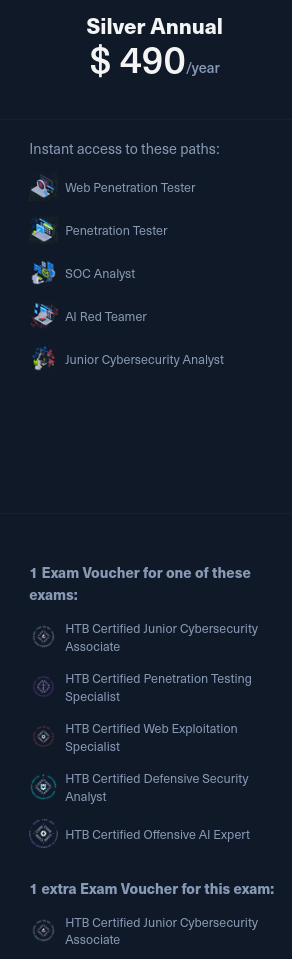 However, if you desire to purchase it yourself it will run you $125 USD to purchase the course with cubes (1220 cubes) and $210 for the certification voucher. Brining your total to $335.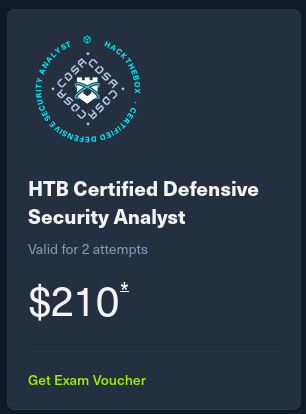
NOTE: If you happen to be in control of a .edu email account you can purchase the $8 monthly student access, which grants you access to the SOC Analyst Path instead of an expensive membership.
Who am I?
It makes sense to ask if I am qualified to provide this advice. I am someone who had passed the CDSA recently and as of the time of writing has been working as an incident response analyst for about a year. Before that I started studying cybersecurity in college as a freshman while pursuing a computer science degree. So just for clarity, professionally I am a beginner, but I have been experienced with a lot of topics that are covered in the exam. I started studying the SOC analyst path back in November of 2025 and finished in February of 2026. I was not only focusing on getting the path done and obtaining my CDSA though. If you wanted to solely focus on getting the cert, I think you could complete the course and exam within a month, even if you are working a 40 hour a week job or going to school.
Brief Overview of the Course
The Content
The course involves 15 modules, while I think all are great in terms of information that is useful as a SOC analyst, not all modules are as applicable to the exam as others. Additionally, if you are reading this then you are probably already familiar with the contents. Because of that I’ll just go over how applicable each module is in reference to the exam.
- Incident Handling Process
- Good to know how the process works. However, after you have read this once, you’re unlikely to reference this again.
- Security Monitoring & SIEM Fundamentals
- Good for a bit of beginner practice with Elastic, however creating dashboards and the such won’t prove too useful to an incident that has already occurred. At least in my own opinion.
- Windows Event Logs & Finding Evil.
- This one is pretty useful for getting the grasp of how windows logging works and some tools you can use to make it easier. It does go through tracing events a little bit and does have a nice list of useful event IDs within it.
- Introduction To Threat Hunting & Hunting With Elastic
- Pretty good and likely to be referenced during the exam. More specifically “The Threat Hunting Process” is well written and is pretty helpful to reference when you get stuck on the exam.
- Understanding Log Sources & Investigating With Splunk
- Useful for Splunk practice, if you have used Splunk before I don’t expect you to reference this one.
- Windows Attacks & Defense
- One of the most useful modules for the exam. Take good notes while going over this module. All of the attacks listed within hthis module are provided with methods of detection for them.
- Intro To Network Traffic Analysis.
- If you have used something like Wireshark before, I don’t see you referencing this module.
- Intermediate Network Traffic Analysis
- Nice module, if you are provided with network logs. You’ll likely be referencing this.
- Working With IDS/IPS
- Useful if you have access to the specific the IDS/IPS logs for the exam.
- Introduction To Malware Analysis.
- If you are provided the resources to pull a malicious sample for the exam, this can prove tremendously useful. I reccomend you become comfortable with the idea of using the skills within this module as it can make you final report look very nice.
- JavaScript Deobfuscation
- This can quite circumstantial depending on if you even have JavaScript code to deobfuscate during the exam. However, try to take a step back and focus on taking in the skills of obfuscation and deobfusacation as it does translate to other programming languages that use Just-In-Time compilation.
- YARA & Sigma For SOC Analysts.
- This one is pretty critical, automation will speed up your investigation tremendously. I slept on this and I paid the price for it dearly.
- Introduction To Digital Forensics.
- Very critical module, I mean you are acting as a DFIR analyst in the exam, so take thorough notes on EVERYTHING in this module. I know some of the labs are long, but they are very useful.
- Detecting Windows Attacks With Splunk
- I view this as an expansion of the Windows Attacks & Defense module. That being said it is pretty useful tracking Windows attacks within a SIEM and the skills do translate to an Elastic SIEM as needed.
- Security Incident Reporting
- As you are submitting a report at the end of your investigation, this module is quite important. If you are like me you’ll have the
Real-world Incident Reportup on another monitor while writing anything in your report.
- As you are submitting a report at the end of your investigation, this module is quite important. If you are like me you’ll have the
Advice on Taking Notes
For taking notes specific to the exam, make yourself a cheat sheet of things you are likely to reference. This would include tools, how said tools are used, useful event IDs, IoCs for known attacks, and the leverage certain access grants an attacker.
Advice on Taking the Exam
In my opinion this exam is incredibly tough. For me personally, I barely met the question quota and was working until about 10 minutes before submission time. That being said I do have some bits of advice that helped me quite a bit once I started taking the exam.
- You are provided 20 questions for only one incident, they are written in a way that does leak some information to you, I believe this is intentional. Use this to your advantage. For example a very generic question could look something like:
A process on host randomservice.htb.local injected into another process. What was the PID of the process that preformed the injection?This tells you that:- The host randomservice.htb.local has been compromised and as such, there had to be a series of events leading to the host’s compromise.
- There is a process that has injected into at least 1 other process on the host.
- The process that was injected into was likely used to either gather data or access.
- The moment you find something that may be interesting, take a screenshot of it and write it down.
- Don’t forget to take note of the time this occurred within your timeline. Use a tool like Excel or Libre Calc cause it’s easier than keeping track in a document.
- This exam is open note, please reference the past readings of the course and search up IoCs. Hackers, from personal experience, want the quickest way to compromise a host, as a SOC analyst you’ll see well known tools pop up again and again. Always search up unique characteristics that could help you identify a tool then please take the time to research and understand it.
- You likely won’t find everything linearly, that’s fine. Just make sure that if something is notable you take a picture and write it down.
- Work on one incident at a time. If you feel stuck then taking a break can help, but keep your focus on one incident at a time.
- Don’t be discouraged by lack of progress with the questions, I didn’t reach the quota until day 6.
- If you get stuck during your investigation are a few things that can help:
- You did see if you could run Sigma or YARA rules right? Automative tools can speed things up tremendously, I sadly did not learn this until after the exam when I saw someone using them for sherlocks.
- Analyze the spot you are stuck on from a red team prospective. Think about the following then form and test a hypothesis on this.
- What do you currently have access to?
- What can you try to get access to?
- How would you try to gain that access?
- Take breaks, speaking from experience this is not an exam in which you can keep ramming your head into the wall in the hopes of breaking through without taking a breather. Stress will make you panic and panic will make you over look things.
Tools That Will Prove Helpful During the Exam
- Sysreptor:
- This is a tool used to help write alerts. It allows you to write in markdown, which is nice for quickly formatting many things. The alternative is writing a word processing application of your choice, which they do give you a template for. However, I think HTB should outright recommend this tool in the course as they have already endorsed the use of this tool by providing templates for many of their exams, including the CDSA. Below are some instructions for setting up Sysreptor with the HTB templates.
- CyberChef:
- Great for deobfuscation and can be used to create MD5 hashes of things.
- LibreCalc or similar spread sheet software.
- Keeping track of the timeline sucks, you will not find everything linearly, and sorting things manually is a pain. A spread sheet application makes it a lot easier. Then once you are done you can copy and paste your entire timeline all at once into your final report.
- The DFIR Report
- Provides many examples of legitimate DFIR reports that are great to reference.
- Sysmon Event ID Guide
- A guide by Black Hills, you may already know about this, but it’s a generally helpful resource to have if you have access to sysmon logs during the exam. Otherwise it’s very useful both in the exam and externally.
How I Recommend to Take the Exam
Quick word, this is adapted from Bruno Rocha Moura’s guide for the CPTS. I think it was really well written, but my advice is not completely my own. So be sure to give his guide a read as well.
Before Starting the Exam
- Create that cheat sheet that we mentioned earlier. This should include not only the important takeaways from the course but any personal notes you have taken from external resources.
- Setup Sysreptor. Make sure you have the template ready.
- Have any website you may need to reference ready to go. All material you see should be on the course. HTB does have a search feature but that can be hit or miss a lot of the time in my personal opinion.
During the Exam
- Read the briefing: Once you start the exam you will be presented with your scenario that gives you important context for your report, like who the company is and what sort of important data they might have.
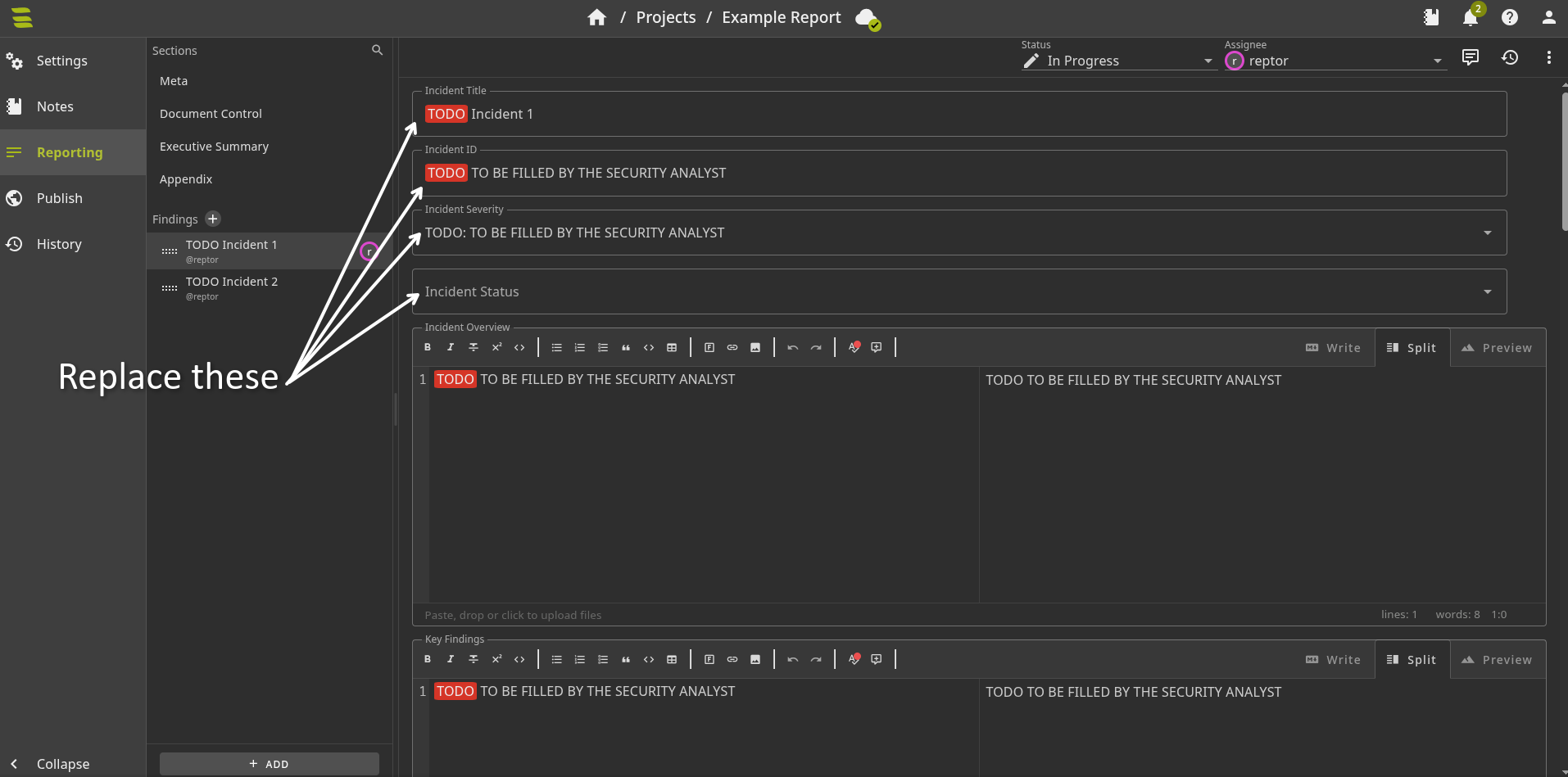
- Download the provided template: You are either dead set on using a word processing application or are using Sysreptor. Either way, the template includes information you will not see elsewhere. This will be the Engagement Contacts, Incident IDs and the Incident Statuses.
- Prepare your report:
- Fill out the Meta Section
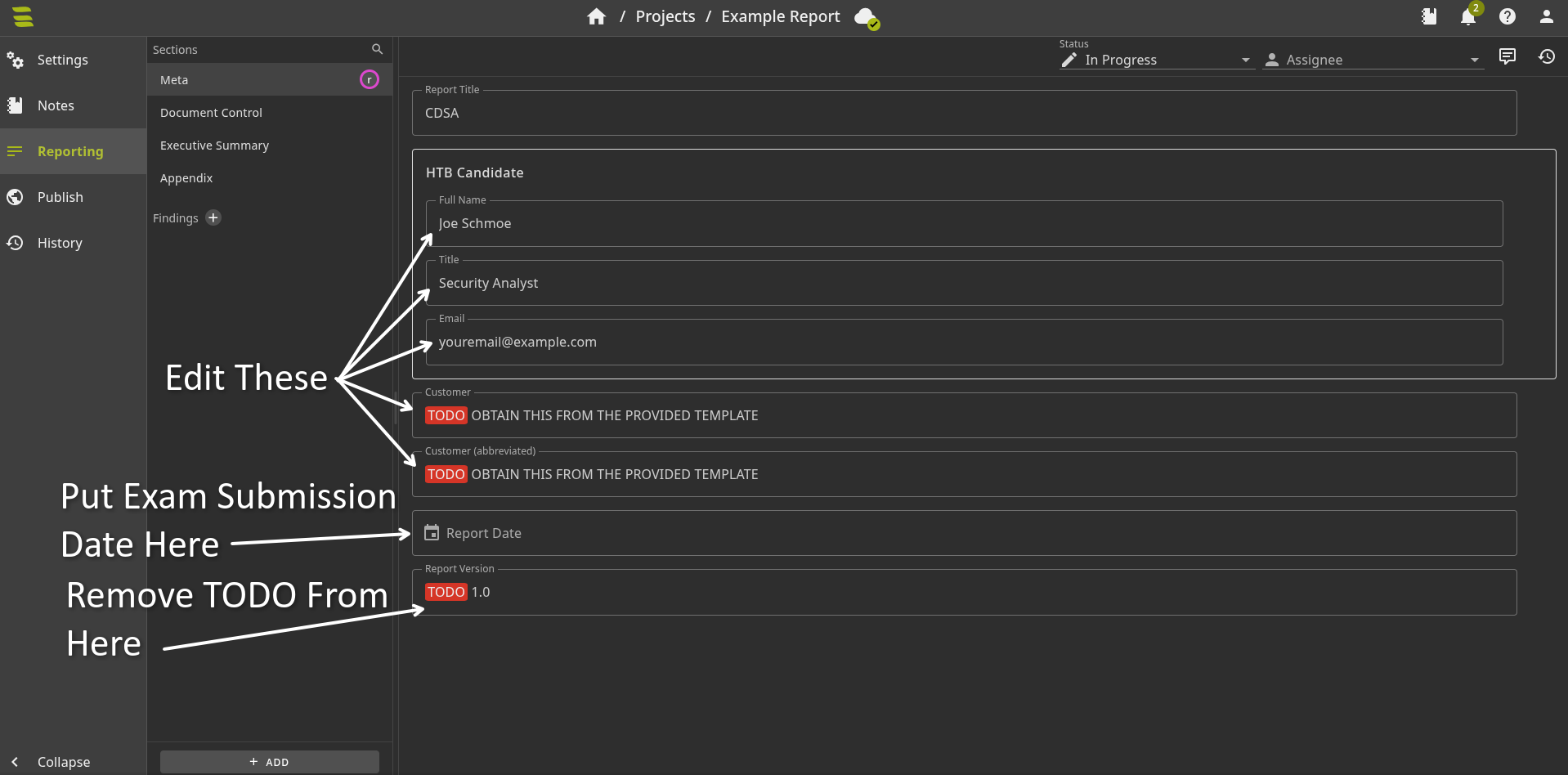
- Add the provided contacts in the Document Control section
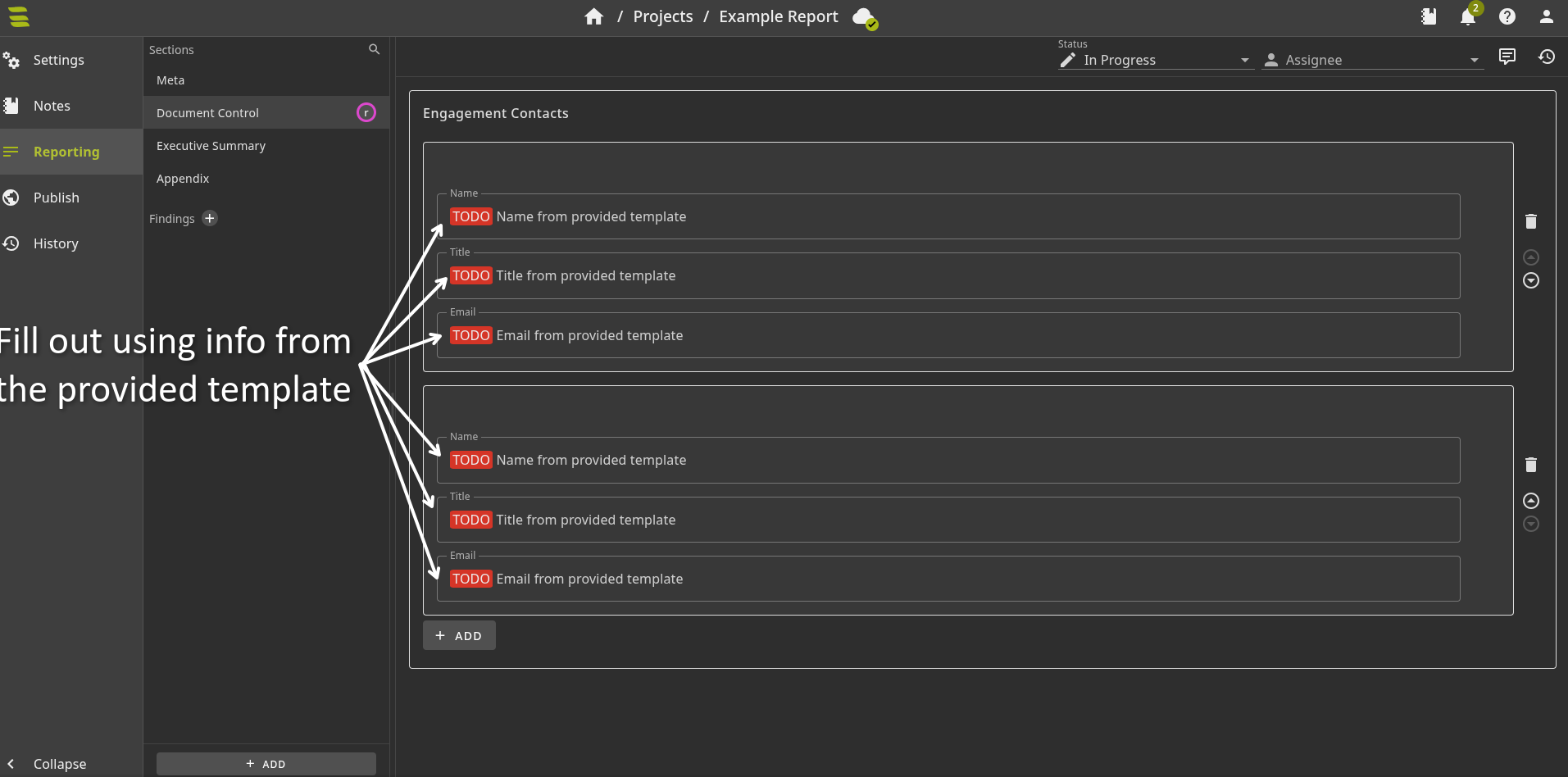
- Leave the Executive Summary as is.
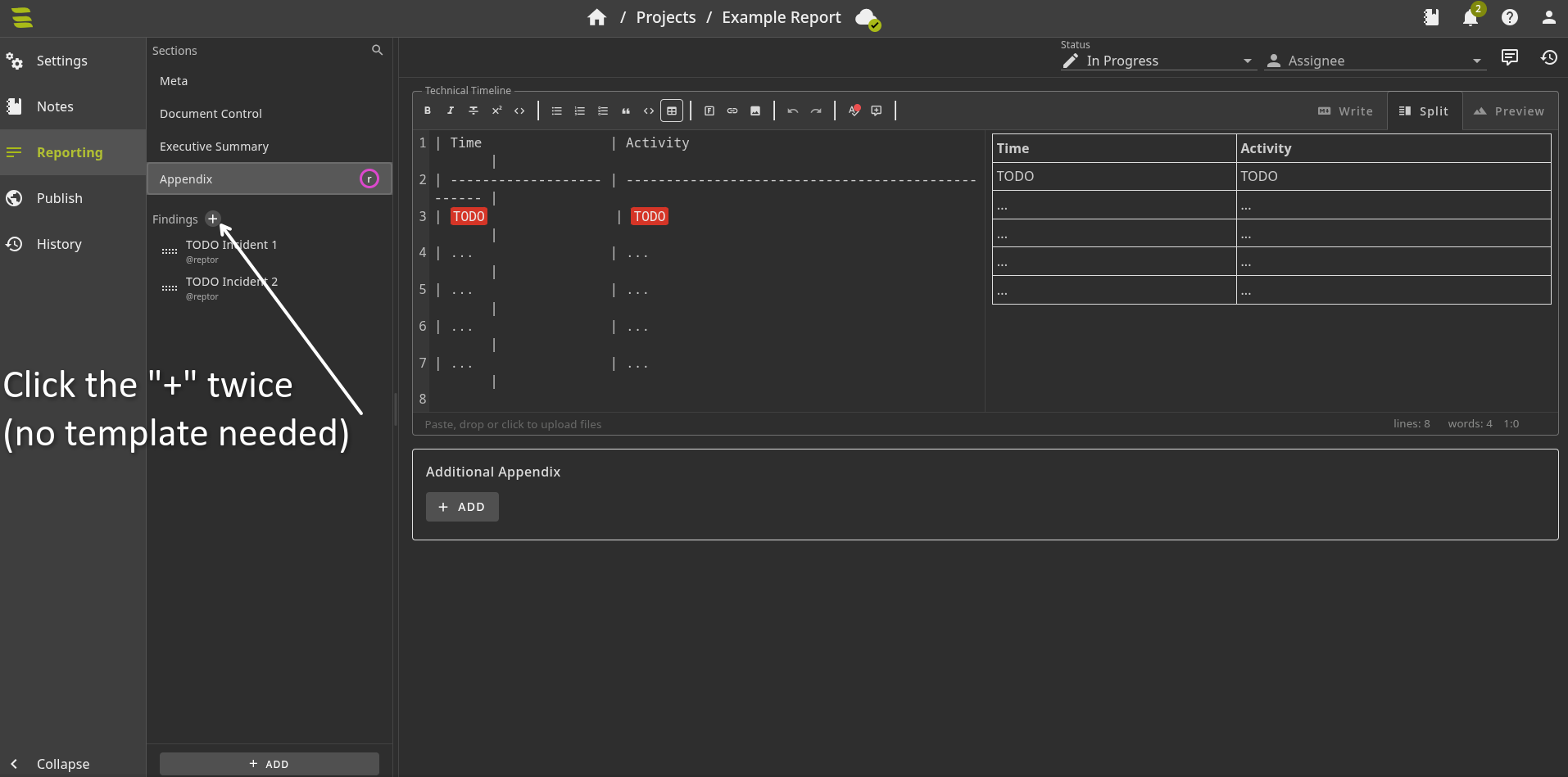
- Create two different tables for you Technical Timelines in the Appendix
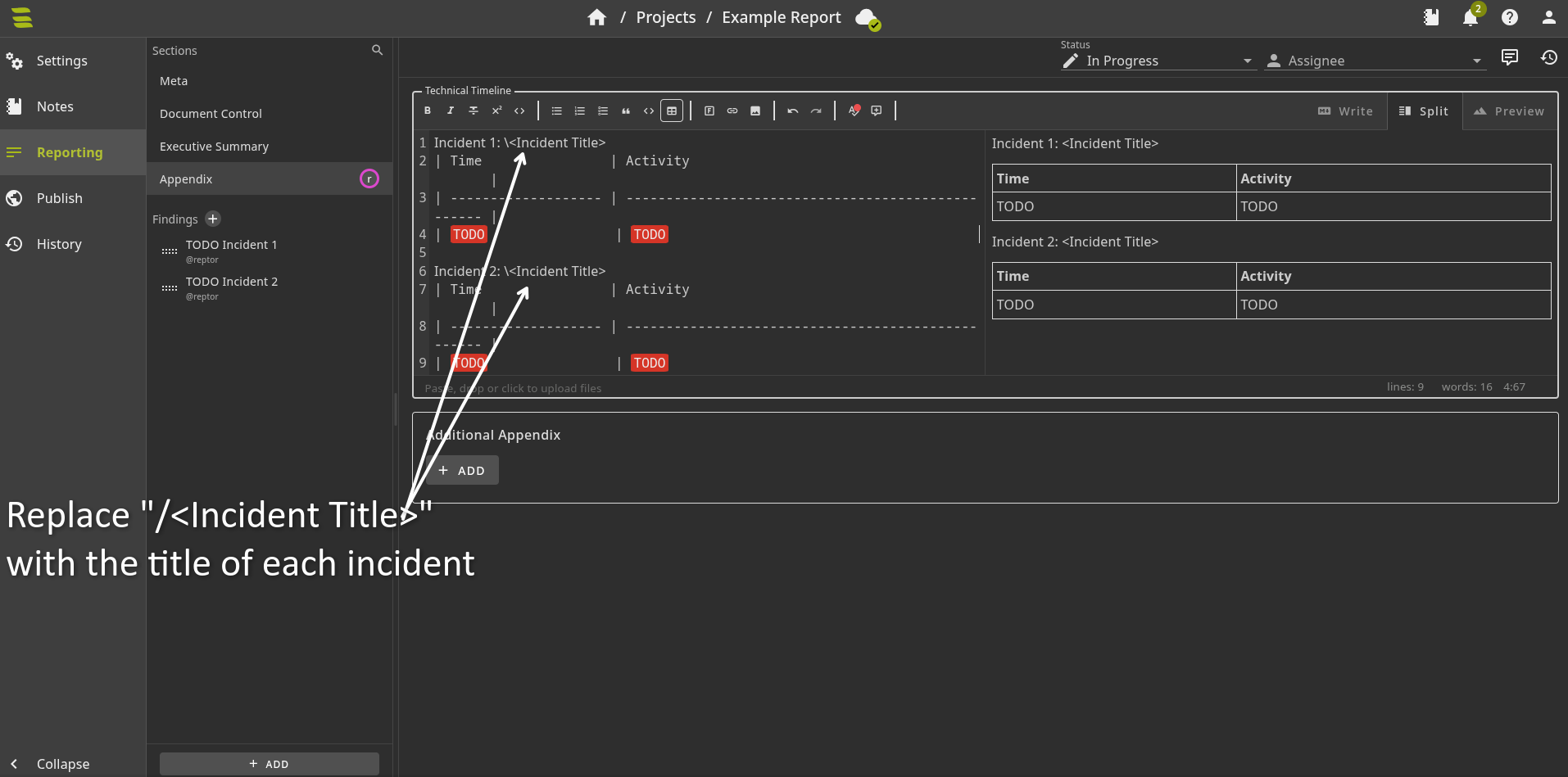
- Create a finding for both incidents
- Fill out the “Incident Title”, “Incident ID”, “Incident Severity”, and “Incident Status” according to how it is listed in the provided template for each incident.
- Fill out the Meta Section
- Begin your first investigation: Start your exam box and use the information provided to you in the briefing to confirm the activity and start. When you find anything of note:
- Take a picture of it (including any query or command line used to get said information)
- Record it in your timeline spreadsheet.
- Record any IoCs if applicable.
- Note down any new “Affected Systems & Data” in it’s section.
- Add this information to your “Evidence Sources & Analysis”. This will make it look very rough, but trust me it is easier to edit it down later than it is to try and create it once the investigation has concluded.
- After your first investigation has concluded: You’ll have enough data to write a serviceable report. Fill out the following to the best of your ability:
- Incident Overview
- Key Findings
- Immediate Actions
- Stakeholder Impact
- Root Cause Analysis
- Technical Timeline (the one within your finding), use your spread sheet to help with this one.
- Nature of the Attack
- Technical Timeline (this time the one in the Appendix), copy and paste your timeline spreadsheet into the technical timeline.
- Repeat Steps 4 & 5 for the second incident
- Edit your reports: Take time to make your reports look really nice. This does not mean long, just nice and readable for the intended parties.
- Submit your report: No matter what submit something, even if you don’t think you’ll pass you need to submit a good faith attempt at a report in order to qualify for your free second attempt. You can create a PDF from the “Publish” tab in Sysreptor. Don’t forget at bare minumum remove all TODOs. Even I felt my report wasn’t enough to pass, but HTB felt otherwise.
Additional Resources to Review For the Exam
The SOC analyst course has all the information that you need to complete the exam, but here are some helpful places in which you can practice your skills from the course.
- CDSA Preparation Sherlock Track: I really wish they did more to promote this because this is a lot of good practice and I didn’t know it existed before taking my exam. Having completed most of them afterwards I can say it certainly does help. These are labs that allow you to practice your skills with provided logs. However, only the first two Sherlocks are free, the others cost a subscription. So complete the first two before deciding if you want to shell out the money. Note: To best practice this, I recommend trying to get a good grasp of the incident without looking at any of the questions, then look at the questions. As in the exam these questions will leak information to you, but you want to also prepare for the incident that lacks questions. Don’t forget to look at the provided write-ups to see how others solved the Sherlock.
- The Junior Cybersecurity Associate path: I made the mistake of focusing purely on blue-teaming concepts. It’s helpful to know how the red team thinks dammnit! There is a bit of overlap with the SOC analyst path and you don’t have to do all of these, but I at least recommend the Introduction To Penetration Testing, Pentest in a Nutshell, and the Footprinting modules to get a bit of red team perspective.
- Boss of the SOC (BOTS) 3: A data set and challenges to solve with Splunk. You don’t have to complete the entire thing, but it will get you very comfortable with using Splunk.
- What others have to say on the exam: Below are other takes on this exam that I think are good to take a look at. Take everything I saw with a grain of salt and compare it to what others have to say!
Overall thoughts on the Exam
This exam is tough, but I found it worth it to put myself to the test and help figure out where I would need to improve. Admittedly, this exam really only will hold value to yourself as I have yet to see an HR employee or job listing recognize it.
Final Words of Advice
- Unless you are super strapped for time you shouldn’t need to take any time off for the exam, just budget your time appropriately before hand.
- I found it best for my sanity, to view my first attempt as a test trial that if you do well enough on then you don’t have to move on to the actual attempt. You do get two attempts, provided you make an effort to submit a report at the end of your first attempt.
- In my experience nothing on this exam was complicated, it just required you to be thorough. If you feel something is complicated, you’re probably overthinking it.
- You’ll likely feel pressed for time, however please take breaks they will help you.